Hip Implants and Aggrecan
The most technical project to date — a molecular mechanism-of-disease animation of aggrecanase cleaving aggrecan in articular cartilage, built with BioPython-scripted structures, hair-based GAGs, Xpresso-orchestrated hydrolysis, and B-factor turbulence in Cinema 4D and Redshift.
- Cinema 4D
- Redshift
- molecular animation
- mechanism of disease
- BioPython
- Xpresso
- Substance Designer
- L-System
Welcome to the treadmill.
This is likely the most technical project I’ve undertaken. Get ready for a long one…
Aggrecan, a macromolecule in the cartilage of your hip joint, is part of the spring in your step. It creates the chemical environment that cushions bone. If it degrades and escapes the cartilage you end up with osteoarthritis. That’s what’s happened to three of my parents’ four hips so far, so I figured I would learn more for when the titanium implant bell tolls for me. While I studied my dad’s limp closely and reproduced it here in the form of a greenish blue torso and legs, which I think looks pretty cool, this is in fact much more of a molecular mechanism of disease (MoD) animation, highlighting the action of an enzyme that cleaves aggrecan within the articular cartilage of the femoral head. This enzyme, aggrecanase, which is a type of matrix metalloproteinase, breaks down aggrecan as part of cartilage remodeling and repair, allowing aggrecan to part with its anchor to large hyaluronan molecules and leave the extracellular matrix. In osteoarthritis, aggrecanase works overtime while aggrecan is not replaced, leading to loss of cartilage.
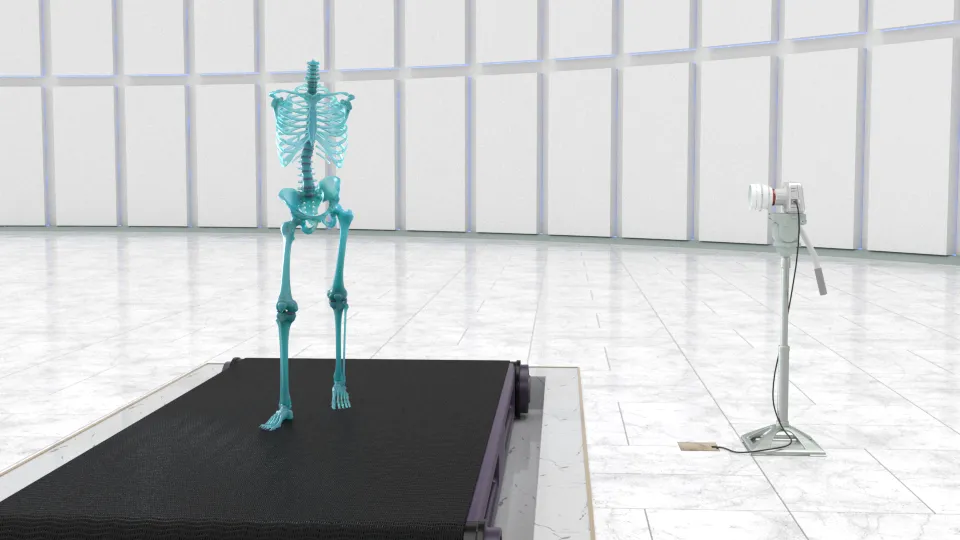
I strove to make this portion as accurate, cinematic, and comprehensible as possible, which is inherently a tough balance. In a nutshell, everything in the molecular animation is way less crowded and way way slower than it would be in a real, live extracellular matrix. This helped with the cinematic quality and intelligibility of the main actors in the scenes. To see more about how crowded the molecular stage gets, along with other principles of animated molecular representations, check out this great summary by Stuart Jantzen.
The sizes and proportions of cells, fibers, and other macromolecules, however, are true to scientific reality (as close as the 50+ journal articles got me to it at least).
Why not ePMV?
Since this project was about being as physically accurate as I could muster, without making an illegible Brownian mess, I wanted to use the best tools available to the 3d package I was using (Cinema 4D R21), which in this case would have included a plugin called ePMV (embedded python molecular viewer). So why did I use something else instead?
ePMV does lots of things by default. It creates a lot of objects and nulls as soon as you fetch or load a pdb, and immediately puts over 100 materials in the material manager. The atomic representation is done through instances: hundreds, or thousands of sphere instances, which to be fair are straightforward to work with individually. But I figured I could make something more streamlined using cloners and tags that would be more performant with multiple macromolecules in a scene at once. From ePMV I just wanted the point clouds and backbone splines, but creating those could be something scripted as well. In order to get the atomic species and position data into a python script I decided to look for an existing pdb parsing python package (very quickly after considering an attempt to write my own). Luckily a package called BioPython has been around for a couple decades for use in computational biology and bioinformatics that had everything I needed. So I installed the BioPython package into the c4d python environment. Then I wrote a series of python scripts to fetch the pdb (or mmCIF), create a point cloud, add an atom cloner, the spline-backbone for rigging (and another for adding α-carbon joints and a skin deformer to the point cloud residues per joint), B-factor (temperature) tags, color and atomic radii tags, and various point selection tags based on specific residue or atom input.
import c4d
from c4d import gui, storage
import os
from pprint import pprint
from Bio.PDB import *


doc = c4d.documents.GetActiveDocument()
op = doc.GetActiveObject()


atom_radii = {"A": 1.7, "N": 1.54, "C": 1.7, "CA": 1.7, "O": 1.52, "S": 1.85,
              "H": 1.2, "P": 1.04, "F": 1.47, "Ca": 2.31, "ZN": 1.39}


atom_colors = {"A": (0.5, 0.5, 0.5), "N": (0.38, 0.62, 1.0),
               "C": (0.7, 0.7, 0.7), "CA": (0.3, 0.3, 0.3), "O": (0.84, 0.29, 0.29,),
               "S": (0.90, 0.87, 0.32), "H": (1.0, 1.0, 1.0), "P": (1.0, 0.58, 0.0),
               "F": (0.44, 0.89, 0.44), "Ca": (0.58, 0.57, 0.37), "ZN": (0.9, 0.9, 0.9)}


standard_aa_names = ["ALA", "CYS", "ASP", "GLU", "PHE", "GLY", "HIS", "ILE", "LYS",
                     "LEU", "MET", "ASN", "PRO", "GLN", "ARG", "SER", "THR", "VAL",
                     "TRP", "TYR"]
# preset booleans:
global nucleic_acid
nucleic_acid = False


#------- User Data
def createUserDataGroup(obj, name, parentGroup=None, columns=None, shortname=None):
    if obj is None: return False
    if shortname is None: shortname = name
    bc = c4d.GetCustomDatatypeDefault(c4d.DTYPE_GROUP)
    bc[c4d.DESC_NAME] = name
    bc[c4d.DESC_SHORT_NAME] = shortname
    bc[c4d.DESC_TITLEBAR] = 1
    bc[c4d.DESC_DEFAULT] = 1
    if parentGroup is not None:
        bc[c4d.DESC_PARENTGROUP] = parentGroup
    if columns is not None:
        bc[22] = columns


    return obj.AddUserData(bc)


def addColorUserData(obj, atom, c, parent_group):
    color = c4d.Vector(*c)
    bc = c4d.GetCustomDataTypeDefault(c4d.DTYPE_COLOR)  # Create default container
    bc[c4d.DESC_NAME] = atom
    bc[c4d.DESC_SHORT_NAME] = atom
    bc[c4d.DESC_ANIMATE] = c4d.DESC_ANIMATE_OFF
    bc[c4d.DESC_PARENTGROUP] = parent_group
    bc[c4d.DESC_DEFAULT] = color
    element = obj.AddUserData(bc)
    obj[element] = color
    return element


def addSizeUserData(obj, atom, r, parent_group):
    bc = c4d.GetCustomDataTypeDefault(c4d.DTYPE_REAL)
    bc[c4d.DESC_NAME] = atom
    bc[c4d.DESC_SHORT_NAME] = atom
    bc[c4d.DESC_STEP] = 0.01
    bc[c4d.DESC_ANIMATE] = c4d.DESC_ANIMATE_OFF
    bc[c4d.DESC_PARENTGROUP] = parent_group
    bc[c4d.DESC_DEFAULT] = r
    element = obj.AddUserData(bc)
    obj[element] = r
    return element


def addSwitchUserData(obj, name, state, parent_group):
    bc = c4d.GetCustomDataTypeDefault(c4d.DTYPE_BOOL)
    bc[c4d.DESC_NAME] = name
    bc[c4d.DESC_SHORT_NAME] = name
    bc[c4d.DESC_ANIMATE] = c4d.DESC_ANIMATE_OFF
    bc[c4d.DESC_PARENTGROUP] = parent_group
    bc[c4d.DESC_DEFAULT] = state
    element = obj.AddUserData(bc)
    obj[element] = state
    return element


#------- End User Data


def pointcloud(name, atoms):
    # populate point list from atom coordinates
    # The import is resulting in mirror flipped structures. Will have to adjust and invert one axis
    point_list = [a.get_coord() for a in atoms]
    pnts = len(point_list)
    # Initialize object
    obj = c4d.PolygonObject(pnts, 0)
    obj_name = str(name) + ' pcloud'
    obj.SetName(obj_name)


    # Create pointcloud
    for id in xrange(pnts):
        v = [f.item() for f in point_list[id]]  # Convert numpy float to native float
        # p = c4d.Vector(*v)  # unpack list of coordinates into vector
        p = c4d.Vector(v[0], v[1], -v[2])  # Adjust for axis flipping
        obj.SetPoint(id, p)
    obj.Message(c4d.MSG_UPDATE)
    # Add object to scene
    doc.InsertObject(obj)
    c4d.EventAdd()
    print 'Added polygon object consisting only of points for atom positions: "%s"' % obj_name
    return obj


def buildSpline(name, atoms):
    # Get alpha carbon list
    if nucleic_acid:
        phosphates = [a.get_coord() for a in atoms if a.get_name() == 'P']
        backbone_atoms = phosphates
        print 'Backbones splines thread through phosphates.'


    else:
        # ca_atoms = [a for a in atoms if a.get_fullname() == ' CA '] #  for some reason FastMMCIF doesn't return spaces
        ca_atoms = [a for a in atoms if a.get_name() == 'CA']
        alpha_carbons = []
        # Calcium atom check
        for a in ca_atoms:
            if a.get_parent().get_resname() == 'CA':
                continue
            elif a.get_fullname() == 'CA  ':
                continue
            else:
                alpha_carbons.append(a.get_coord())
        backbone_atoms = alpha_carbons
        print 'Backbones splines thread through alpha carbons of amino acid residues.'


    # print backbone_atoms
    pnts = len(backbone_atoms)
    # Initialize spline object
    spline = c4d.SplineObject(pnts, c4d.SPLINETYPE_CUBIC)
    spline_name = name + ' backbone'
    spline.SetName(spline_name)
    # Set color to bright green
    spline[c4d.ID_BASEOBJECT_USECOLOR] = 1
    spline[c4d.ID_BASEOBJECT_COLOR] = c4d.Vector(0.3, 1, 0.42)


    for id in xrange(pnts):
        v = [f.item() for f in backbone_atoms[id]]  # Convert numpy float to native float
        # p = c4d.Vector(*v)  # unpack list of coordinates into vector
        p = c4d.Vector(v[0], v[1], -v[2])  # Adjust for axis flipping
        spline.SetPoint(id, p)
    spline.Message(c4d.MSG_UPDATE)
    doc.InsertObject(spline)
    c4d.EventAdd()
    print 'Added spline object "%s" consisting of points located at alpha-carbon position of each residue' % spline_name
    return spline


def annotationTag(obj, name, res_entries):
    readable_entries = []
    for entry in res_entries:
        r_het, r_num, r_name, atom_index_range, res_atoms = entry
        readable_entry = '%s | %i | %s | %i-%i | %s' % (r_het, r_num, r_name, atom_index_range[0], atom_index_range[1],
                                                      ' '.join(res_atoms))
        readable_entries.append(readable_entry)
    anTag = c4d.BaseTag(c4d.Tannotation)
    anTag[c4d.ID_BASELIST_NAME] = name
    anTag[c4d.ANNOTATIONTAG_TEXT] = '\n'.join(readable_entries)
    anTag[c4d.ANNOTATIONTAG_VIEWPORT_SHOW] = 0
    obj.InsertTag(anTag)
    c4d.EventAdd()
    print 'Added annotation tag with full residue:atom list to "%s"' % (obj.GetName())


def bfactorTag(obj, name, atoms):
    bfactor_list = [a.get_bfactor()/100 for a in atoms]  # Divide by 100 to adjust for vertex map percent basis
    num = len(bfactor_list)
    # bmax = max(bfactor_list)
    # bfactor_norm = [b/bmax for b in bfactor_list]
    # Normalization is unnecessary if tag values are unclamped in atom size effector
    bf_tag = c4d.VariableTag(c4d.Tvertexmap, num)
    bf_tag[c4d.ID_BASELIST_NAME] = name + ' temperature (B-factor)'
    bf_tag.SetAllHighlevelData(bfactor_list)


    obj.InsertTag(bf_tag)
    c4d.EventAdd()
    print 'Added B-Factor (temperature factor) values to vertex map tag to "%s"' % (obj.GetName())
    return bf_tag


def pointSelectionTags(obj, name, atoms):


    def insertPSTag(list_name, p_states):
        # print list_name, p_states
        ps_tag = c4d.SelectionTag(c4d.Tpointselection)
        ps_tag.SetName(name + '_' + list_name)
        obj.InsertTag(ps_tag)
        s = ps_tag.GetBaseSelect()
        s.SetAll(p_states)
        print 'Added point selection tag "%s". Total points: %i' % (list_name, s.GetCount())
        c4d.EventAdd()


    print 'Total atoms in chain %s: %i' % (name, len(atoms))
    rs_dict = {'aa': []}
    # build dictionary keys
    for a in atoms:
        key = a.get_parent().get_resname()
        if key not in rs_dict:
            rs_dict[key] = []
    # populate all residue lists with booleans
    # print rs_dict
    for a in atoms:
        for key in rs_dict:
            if key != 'aa':
                if a.get_parent().get_resname() == key:
                    rs_dict[key].append(1)
                else:
                    rs_dict[key].append(0)
        # check if atom is in standard amino acids
        if is_aa(a.get_parent()):
            rs_dict['aa'].append(1)
        else:
            rs_dict['aa'].append(0)


    if nucleic_acid:
        for list_name, p_states in rs_dict.iteritems():
            if list_name != 'aa':
                insertPSTag(list_name, p_states)
    else:
        # Do not include point selection tag for every aa residue
        for list_name, p_states in rs_dict.iteritems():
            if list_name not in standard_aa_names:
                insertPSTag(list_name, p_states)


def makeVertexTags(obj, name, atoms, atom_colors, atom_radii):
    # norm_factor = 2
    num_pts = obj.GetPointCount()
    vm_tag = c4d.VariableTag(c4d.Tvertexmap, num_pts)  # This new tag is for radius values
    vm_tag[c4d.ID_BASELIST_NAME] = name + ' atom sizes'
    vc_tag = c4d.VertexColorTag(num_pts)
    vc_tag[c4d.ID_BASELIST_NAME] = name + ' atom colors'
    # Make points visible
    vc_tag[c4d.ID_VERTEXCOLOR_DRAWPOINTS] = True
    vc_data = vc_tag.GetDataAddressW()
    radii =[]


    uncolored = []
    for pnt in xrange(num_pts):
        species = atoms[pnt].get_name()
        # print species
        # lookup color, radius from dict or return default
        # Calcium check for confusion with alpha carbons
        if species == 'CA':
            if atoms[pnt].get_fullname() == 'CA  ' or atoms[pnt].get_parent().get_resname == 'CA':
                # gui.MessageDialog('This protein may contain calcium. Fix the script.')
                # color = (0,0,0)
                species = 'Ca'
            # Calcium atoms are usually within residues named 'CA'
            # elif atoms[pnt].get_parent().get_resname == 'CA':
            #     # color = (0,0,0)
            #     species = 'Ca'
            # else:  # we have an alpha carbon
            #     color = atom_colors.get(species, (0, 0, 0))
            #     # radius = atom_radii.get(species, 1.0) / norm_factor
            #     # Normalization unnecessary if tag values in atom color effector are unclamped
            #     radius = atom_radii.get(species, 1.0)
        # else:
        # if atoms[pnt].get_parent().get_id()[0][0] != ' ' and species in atom_colors.keys(): # Check if not aa
        if species in atom_colors.keys():
            color = atom_colors.get(species, (0,0,0))  # Use first letter only for dict retrieval
            radius = atom_radii.get(species, 1.0) - 1.0  # Account for effector relative scaling


        else:
            color = atom_colors.get(species[0], (0,0,0))
            radius = atom_radii.get(species[0], 1.0) - 1.0  # Account for effector relative scaling
        # Check if atoms were retrieved that are not defined in color, size dictionaries
        if color == (0,0,0) and species not in uncolored:
            uncolored.append(species)
        # radius = atom_radii.get(species[0], 1.0) / norm_factor
        radii.append(radius)
        vc_tag.SetColor(vc_data, None, None, pnt, color)
        vc_tag.SetAlpha(vc_data, None, None, pnt, 1.0)
    # Split out vertex color alpha, which contained radius values to its own vertex map
    vm_tag.SetAllHighlevelData(radii)


    obj.InsertTag(vc_tag)
    obj.InsertTag(vm_tag)
    c4d.EventAdd()
    if uncolored:
        uncolored_error = 'WARNING: These species have undefined colors and/or sizes: ' + ', '.join(uncolored)
        print name + ': ' + uncolored_error
        gui.MessageDialog(name + ': ' + uncolored_error)
    print 'Added vertex color tag and vertex map tag (for atom sizes) to "%s"' % (obj.GetName())
    return vc_tag, vm_tag


def residueEntries(chain):
    res_entries = []
    # chain_num = 0
    atom_index_start = 0
    for res in chain.get_residues():
        # r_het = res.get_id()[0][0]
        if res.get_id()[0] == ' ':
            r_het = 'A'
        else:
            r_het = res.get_id()[0][0]
        r_num = res.get_id()[1]
        r_name = res.get_resname()
        res_atoms = [a.get_name() for a in res.get_atoms()]
        atom_index_end = atom_index_start + len(res_atoms) - 1
        atom_index_range = atom_index_start, atom_index_end
        res_entry = (r_het, r_num, r_name, atom_index_range, res_atoms)
        res_entries.append(res_entry)
        atom_index_start = atom_index_end + 1


    return res_entries


def multiObjects(structure):
    def multi_warning(warning_type):
        warning = 'WARNING: Multiple %s present. ' \
                  'Point clouds and splines will be split into separate objects for each chain. ' % warning_type
        gui.MessageDialog(warning)
        print warning
    multi_model = False
    multi_chain = False
    model_num = 0
    chain_num = 0
    for model in structure.get_list():
        model_num += 1
        if model_num == 2:
            multi_model = True
            multi_warning('models')
        for chain in model.get_list():
            chain_num += 1
            if chain_num == 2:
                multi_chain = True
                multi_warning('chains')


    return multi_model, multi_chain


def getOperations():
    options = []
    do_all = False
    do_all = gui.QuestionDialog('Perform all operations? Select No to specify options.')
    if do_all:
        operations = do_all, options
        return operations
    print "Operations --\nPC: point cloud, SP: alpha-carbon backbone spline, AT: annotation tag,\n" \
          "PS: Point Selections, VC: vertex color tag with alpha for size, BF: B-Factor (temperature) tag,\n" \
          "UD: user data for atom color, size"
    ops = ('PC', 'SP', 'AT', 'PS', 'VC', 'BF', 'UD')
    text = 'Input: ' + ', '.join(ops)
    selected = gui.InputDialog(text)
    # print selected
    for s in ops:
        if s in selected.upper():
            options.append(s)
    if options:
        print 'Selected operations: ' + ', '.join(options)
    else:
        print 'No operations selected.'
        # gui.MessageDialog('No operations selected.')
    operations = do_all, options
    return operations


def checkPath():
    path = doc.GetDocumentPath()
    if not path:
        gui.MessageDialog('Save the project first. A new ./cif subdirectory will be created.')
        print 'File save needed before performing requested operation.'
        return False
    return path


def doOperations(operations, chain_name, chain, atoms):
    # React to user requests for operations on protein data
    do_all, options = operations
    if do_all or 'SP' in options:
        if op and op.IsInstanceOf(c4d.Opoint):  # Work on existent point cloud
            obj = op
        spline = buildSpline(chain_name, atoms)
    if do_all or 'PC' in options:
        obj = pointcloud(chain_name, atoms)
    # if not simple_struct:
    if do_all or 'PS' in options:
        pointSelectionTags(obj, chain_name, atoms)
    if do_all or 'AT' in options:
        res_entries = residueEntries(chain)
        annotationTag(obj, chain_name, res_entries)
    if do_all or 'VC' in options:
        vc_tag, vm_tag = makeVertexTags(obj, chain_name, atoms, atom_colors, atom_radii)
    if do_all or 'BF' in options:
        if atoms[0].get_bfactor() and not nucleic_acid:
            if op and op.IsInstanceOf(c4d.Opoint):  # Trying to get a b-factor tag on existent pcloud
                obj = op
            bf_tag = bfactorTag(obj, chain_name, atoms)
        else:
            print 'No meaningful B-Factor information available. Skipping tag creation.'
    # Create User Data:
    if do_all or 'UD' in options:
        atom_details_group = createUserDataGroup(obj, "Atom Details", c4d.DescID(0))
        atom_colors_group = createUserDataGroup(obj, "Atom Colors", atom_details_group, columns=3)
        atom_size_group = createUserDataGroup(obj, "Atom Size", atom_details_group, columns=3)
        # reset_group = createUserDataGroup(obj, "Reset", atom_details_group, columns=2)
        # addSwitchUserData(obj, 'Reset Colors', False, reset_group)
        # addSwitchUserData(obj, 'Reset Sizes', False, reset_group)


        for atom, color in atom_colors.iteritems():
            addColorUserData(obj, atom, color, atom_colors_group)
        print 'Added User Data for atom species colors to "%s"' % (obj.GetName())


        for atom, radii in atom_radii.iteritems():
            addSizeUserData(obj, atom, radii, atom_size_group)
        print 'Added User Data for atom species sizes to "%s"' % (obj.GetName())


        # residue_colors_group = CreateUserDataGroup(obj, "Residue Colors", c4d.DescID(0))
        #TODO Add color by residues


    return obj


# Main function
def main():
    # Prompt user for needed operations
    do_all, options = getOperations()
    # print do_all, options
    if not do_all and not options:
        return False
    # Can only to partial operations on an existent point cloud
    if not do_all and 'PC' not in options:
        obj = op
        if not obj:
            gui.MessageDialog('Select existing point cloud object and rerun.')
            return False


    # Get the information locally or from server
    fetch = gui.QuestionDialog('Fetch from server? Choose No to load a local file.')
    if fetch:
        # Make sure we have a directory to save downloaded cif
        path = checkPath()
        if not path:
            return False
        os.chdir(path)
        # Get input for structure
        protein = c4d.gui.InputDialog('PDB entry', '')
        if protein == '':
            return False
        # Set cif as format since this is the new default
        ext = '.cif'
        protein_file = protein + ext
        protein_path = './cif/' + protein_file
        pdbl = PDBList()
        pdbl.retrieve_pdb_file(protein, pdir ='./cif', file_format ='mmCif')
    else:
        # For local files
        fn = storage.LoadDialog(c4d.FILESELECTTYPE_ANYTHING)
        if fn is None:
            return False
        protein_path = fn
        protein_file = os.path.split(fn)[1]
        protein, ext = os.path.splitext(protein_file)
        # check if pdb is a nucleic acid from http://w3dna.rutgers.edu/index.php/rebuild
        with open(fn) as f:
            first_line = f.readline()
            if 'DNA' in first_line:
                print "PDB is a nucleic acid."
                print first_line
                global nucleic_acid
                nucleic_acid = True


    # Protein in possession. Now let's choose a parser.
    print 'Protein file location: ' + protein_path
    if ext == '.cif':
        parser = FastMMCIFParser()
        print 'Using FastMMCIParser'
    elif ext == '.pdb':
        parser = PDBParser()
        print 'Using PDBParser'
    else:
        gui.MessageDialog('Please select a .cif or .pdb')
        return False


    # Build the primary data
    structure = parser.get_structure(protein, protein_path)


    # Check if multiple models or chains in structure
    multi_model, multi_chain = multiObjects(structure)
    operations = do_all, options


    # Do actual operations
    global simple_struct
    simple_struct = False
    if ext == '.pdb':
        header = parser.get_header()
    else:
        header = False
    # pprint.pprint(header, width=1)
    if not multi_model and not multi_chain:
        print '"%s" is single chain only.' % protein
        chain_name = protein
        atoms = [a for a in structure.get_atoms()]
        if header != False and header['head'] == '':
            print 'No header.'
            simple_struct = True
            chain = structure[0]
        else:
            chain = structure[0]['A']
            if header: pprint(header, width=1)
        obj = doOperations(operations, chain_name, chain, atoms)
    elif multi_model and not multi_chain:
        print '"%s" has multiple models each with a single chain.' % protein
        if header: pprint(header, width=1)
        for model in structure:
            chain = structure[model]['A']  # This will probably break once the case is encountered
            chain_name = protein + '_' + model.get_id()
            atoms = [a for a in model.get_atoms()]
            obj = doOperations(operations, chain_name, chain, atoms)
    elif not multi_model and multi_chain:
        print '"%s" has multiple chains.' % protein
        if header: pprint(header, width=1)
        for model in structure:
            for chain in model:
                chain_name = protein + '_' + chain.get_id()
                atoms = [a for a in chain.get_atoms()]
                obj = doOperations(operations, chain_name, chain, atoms)
    elif multi_model and multi_chain:
        print '"%s" has multiple models and multiple chains.' % protein
        if header: pprint(header, width=1)
        for model in structure:
            for chain in model:
                chain_name = protein + '_' + model.get_id() + '_' + chain.get_id()
                atoms = [a for a in chain.get_atoms()]
                obj = doOperations(operations, chain_name, chain, atoms)


    else:
        print "Error in structure."
        return False


# Execute main()
if __name__=='__main__':
    main()
Import CIF or PDB and build.py — using BioPython in C4D.
When there is no PDB
What happens when it’s not as simple as trawling the protein data bank and pubmed for proteins or protein domains, and the macromolecule you’re attempting to assemble includes an intrinsically unstructured, disordered region. Well you’re hopelessly lost 😳… OR you can write a script with some creative ideas on how to semi-randomly construct one. So this is what I did for parts of the core protein and the inter-globular domain (IGD), where aggrecanase snaps aggrecan off of hyaluronan, its anchor to the cell surface (although in hindsight, I treated the IGD more as a disordered domain than I should have in its composition). Based on the literature and common amino acid frequencies, I output amino acid sequences with corresponding hypothetical bond angles by feeding json files into UCSF Chimera. In the end I imported novel pdb structures into C4D that were plausible, and looked good enough to capture some compelling enzymatic events. The disordered segments of core protein along with homolog pdbs for the globular domains were arranged along a spline-wrap deformer setup with a dynamic spline.
Fast forward to mid-2021, and now we have AlphaFold predicting and publishing full structures of the entire human proteome. In the case of the aggrecan core protein, their prediction of a loose, unstructured IGD looks similar to mine. But without any of the hundreds of glycosaminoglycans populating the core, the whole thing crumbles into a semi-globular pile.
On a more confessional note, the aggrecanase enzyme I chose as the molecule of interest, is actually only the catalytic domain of the enzyme, from the crystallographic pdb structure. Had AlphaFold been available (or had I attempted to construct the full aggrecanase with all the disparate domains on my own), the enzyme portrayed would have been over 4 times as large. And crucial domains predicted to be involved in its binding to the IGD would have been included. So again, let’s just say I sacrificed accuracy for clarity… but having the chance to do it again, I would include the whole protein, with it’s predicted loops and all.
import random
import math
import json
import os
from datetime import datetime


# ------------------------------ Tables ------------------------------------
bond_angles = {'ppI': (-75, 160),  # Polyproline type I (PPI) helix
               'ppII': (-75, 145),  # Polyproline type II (PPII) helix
               'alpha_h': (-57, -47),  # α helix
               '3_10': (-49, -26),  # 3_10 helix
               'pi_h': (-57, -70),  # π helix
               'ap_beta': (-139, 135),  # antiparallel β strand
               'p_beta': (-119, 113),  # parallel β strand
               'tI_1': (-60, -30),  # Type I β turn
               'tI_2': (-90, 0),
               'tII_1': (-60, 120),  # Type II β turn
               'tII_2': (80, 0)}


# res_bonds =   {'ppI':      '',
#                'ppII':     'P',
#                'alpha_h':  '',
#                '3_10':     '',
#                'pi_h':     '',
#                'ap_beta':  '',
#                'p_beta':   '',
#                'tI_1':     '',
#                'tI_2':     '',
#                'tII_1':    '',
#                'tII_2':    ''}


aa_groups = {'polar_uncharged': 'STYNQ',
             'charged': 'HDEKR',
             'uncharged': 'GAVLCMPIFW'}


disordered = 'PMKRSQE'  # These are the most frequent in IUPs according to Kessel p.487


aa = [v for v in aa_groups.values()]
aa = ''.join(aa)


codes = {'Gly': 'G', 'Ala': 'A', 'Val': 'V', 'Leu': 'L', 'Cys': 'C', 'Met': 'M', 'Pro': 'P',
         'Ile': 'I', 'Ser': 'S', 'Thr': 'T', 'Tyr': 'Y', 'Phe': 'F', 'Asn': 'N', 'Gln': 'Q',
         'His': 'H', 'Trp': 'W', 'Asp': 'D', 'Glu': 'E', 'Lys': 'K', 'Arg': 'R'}


# Relative frequencies of amino acid residues in secondary structures from Stryer Biochem 7th ed. pg. 51
#  α helix, b sheet, reverse-turn
rel_freq = {'Glu': [1.59, 0.52, 1.01],
            'Ala': [1.41, 0.72, 0.82],
            'Leu': [1.34, 1.22, 0.57],
            'Met': [1.30, 1.14, 0.52],
            'Gln': [1.27, 0.98, 0.84],
            'Lys': [1.23, 0.69, 1.07],
            'Arg': [1.21, 0.84, 0.90],
            'His': [1.05, 0.80, 0.81],
            'Val': [0.90, 1.87, 0.41],
            'Ile': [1.09, 1.67, 0.47],
            'Tyr': [0.74, 1.45, 0.76],
            'Cys': [0.66, 1.40, 0.54],
            'Trp': [1.02, 1.35, 0.65],
            'Phe': [1.16, 1.33, 0.59],
            'Thr': [0.76, 1.17, 0.96],
            'Gly': [0.43, 0.58, 1.77],
            'Asn': [0.76, 0.48, 1.34],
            'Pro': [0.34, 0.31, 1.32],
            'Ser': [0.57, 0.96, 1.22],
            'Asp': [0.99, 0.39, 1.24]}


# ------------------------------ Operations ------------------------------------


def randomSequence():
    # Make a preliminary weighted random sequence of residues of defined length from user specified bond-type weighting
    res_weights = {}
    for r in aa:
        for group, residues in aa_groups.items():
            if r in residues:
                w = weighting[group]
                entry = (r, w)
                # print(entry)
                res_weights[r] = w
        # Correct for disordered residues
        if r in disordered:
            res_weights[r] = weighting['disordered']
        # Correct for P and others specified
        if r in weighting.keys():
            res_weights[r] = weighting[r]


    aa_list = []
    weights = []
    for r, w in res_weights.items():
        aa_list.append(r)
        weights.append(w)


    rand_seq = random.choices(aa_list, weights, k=total_rand_res)


    return rand_seq


def initializeBonds(seq, run, interlude, bias):
    # Make list of bond types for above random sequence based on rel_freq types and turn bias value
    seq_rel_freqs = {codes[k]: v for k, v in rel_freq.items()}
    rel_freq_types = ('alpha_h', 'ap_beta', 'turn')
    # Create non-negative bias list for turn frequency values
    # if bias > 0:
    #     bias_list = [math.cos(i/len(seq)*2*math.pi)+1*0.5 * bias for i in range(len(seq))]
    bond_types = []


    for index, res in enumerate(seq):
        if bias > 0:  # adjust turn freq based on positive cosine function and bias value
            current_freqs = seq_rel_freqs[res].copy()
            current_freqs[2] *= (math.cos(index/(len(seq))*2*math.pi)+1) * 0.5 * bias
            if index == insert_index or index == insert_index - 1:
                current_freqs[2] = 0  # Make sure insert doesn't occur in the middle of a turn
        btype = random.choices(rel_freq_types, weights=current_freqs)[0]  # returns a list with a single value
        # if res == 'P':
        # Change % of bonds to ppII
        if random.random() < ppII_freq:
            btype = 'ppII'
        bond_types.append(btype)
    # Fix turns so they come in doubles to make a full hairpin
    turns = 0
    for i in range(len(seq)):
        if bond_types[i] == 'turn':
            turns += 1
            if i > 0 and bond_types[i-1] == 'turn':  # Get out if the turn is already completed
                continue
            bond_types[i] = 'tI_1'  # TODO: should I ever straighten a turn?
            if i < (len(seq)-(interlude+1)):  # check to not run out of list range
                bond_types[i + 1] = 'tI_2'  # add turn complement for hairpin
                # Fix sequence so a hairpin turn is complemented by another hairpin within interlude amount of residues
                scan_fwd = bond_types[i+2: i+2+interlude]
                # Are there no closely upcoming complementary turns and is there currently an odd number of turns?
                if turns % 2 == 1 and 'turn' not in scan_fwd:  # randomly reassign a bond type in the scan_fwd list to a turn
                    reassigned = random.randrange(interlude)
                    scan_fwd[reassigned] = 'turn'
                    bond_types = bond_types[:i+2] + scan_fwd + bond_types[i+2+interlude:]


        # Make ends straight
        if i < 4 or i > (len(seq)-4):
            bond_types[i] = default_bond


    # Make phi, psi bond angles list
    phi_psi = [bond_angles[a] for a in bond_types]
    run += 1
    return bond_types, phi_psi, turns, run


def targetInsert(angles, index, insert, seq):
    # Insert target sequence
    index += 1
    new_seq = seq[:index] + list(insert) + seq[index:]
    # target_angles = [default_bond] * len(insert)
    target_angles = []
    for i in range(len(insert)):
        r = random.random()
        if r < ppII_freq:
            target_angles.append('ppII')
        else:
            target_angles.append(default_bond)


    target_phi_psi = [bond_angles[a] for a in target_angles]
    angles = angles[:index] + target_phi_psi + angles[index:]


    return new_seq, angles


def writeToJSON(path, file_name, data):
    file_path = f'{path}/{file_name}.json'
    with open(file_path, 'w') as fp:
        json.dump(data, fp, indent=2)


    print(f'Created "{os.getcwd()}\{path[2:]}\{file_name}.json"')


# ------------------------------ Inputs ------------------------------------
seq_name = 'Aggrecan_IGD'
insert_seq = 'NITEGEARGSVI'


total_rand_res = 100
total_res = total_rand_res + len(insert_seq)
insert_index = 50


turn_interlude = 5


default_bond = 'ap_beta'


weighting = {'polar_uncharged': 0.7,
             'charged':         1,
             'uncharged':       0.01,
             'P':               2,
             'disordered':      1.5
             }


print(f'Target: {insert_seq}')
print(f'Additional random residues: {total_rand_res}')


# ---------------------------- Conditions -----------------
maxrun = 10000
straight = 180
angle_variation = 45
max_turns = 8
# Turn bias factor using cosine function to decrease turn probability in center
turn_bias = .9
turn_bias = float(turn_bias)
# Create adjustable turn factor to change likelihood of turns
turn_factor = 0.4
ahelix_factor = 0.05
ppII_freq = 0.25
for v in rel_freq.values():
    v[2] *= turn_factor
    v[0] *= ahelix_factor


def main():
    runs = 1
    turns = 999
    phi_direction = 999
    psi_direction = 999
    random_seed = 0
    random.seed(random_seed)


    while turns > max_turns or turns % 2 == 1 or abs(phi_delta) > angle_variation or abs(psi_delta) > angle_variation:
        if runs > maxrun:
            print('\nHit maximum run limit.')
            exit()
        print(f'\nRun {runs}')
        rand_seq = randomSequence()
        print(f'Random seed: {random_seed}')
        print(f'Random seq: {"".join(rand_seq)}')
        bond_types, phi_psi_angles, turns, runs = initializeBonds(rand_seq, runs, turn_interlude, turn_bias)
        phis = [a[0] for a in phi_psi_angles]
        psis = [a[1] for a in phi_psi_angles]
        phi_sum = sum(phis)
        psi_sum = sum(psis)
        phi_direction = phi_sum % 360
        phi_delta = phi_direction - straight
        psi_direction = psi_sum % 360
        psi_delta = psi_direction - straight
        print(f'phi angle sum: {phi_sum}, end direction: {phi_direction}')
        print(f'psi angle sum: {psi_sum}, end direction: {psi_direction}')
        print(f'total turns: {turns}')
        random_seed += 1
        random.seed(random_seed)


    print('******** Requirements met. *********')
    processed_seq, phi_psi_angles = targetInsert(phi_psi_angles, insert_index, insert_seq, rand_seq)
    print(f'Target inserted at index: {insert_index}')
    processed_seq = ''.join(processed_seq)
    print(f'Full sequence: {processed_seq}')
    print(f'Bond types: {bond_types}')
    print(f'Bond angles: {phi_psi_angles}')


    dt = datetime.now().strftime("%y-%m-%d; %H-%M-%S")
    # JSON file info
    json_path = './json'
    json_filename = f'{seq_name} ({total_res} residues, insert at {insert_index}, seed {random_seed}, dt {dt})'
    json_data = {}
    json_data['name'] = seq_name
    json_data['insert'] = insert_seq
    json_data['insert_location'] = insert_index
    json_data['total residues'] = total_res
    json_data['seed'] = random_seed
    json_data['turn bias'] = turn_bias
    json_data['turn factor'] = turn_factor
    json_data['turns'] = turns
    json_data['alpha helix factor'] = ahelix_factor
    json_data['ppII frequency'] = ppII_freq
    json_data['weighting'] = weighting
    json_data['phi angle sum mod 360'] = phi_direction
    json_data['psi angle sum mod 360'] = psi_direction
    json_data['seq'] = processed_seq
    json_data['angles'] = phi_psi_angles
    writeToJSON(json_path, json_filename, json_data)


if __name__ == '__main__':
    main()
Creating bond angles for the IGD sequence → json → import to build the pdb in UCSF Chimera.
Hair, hair, hair
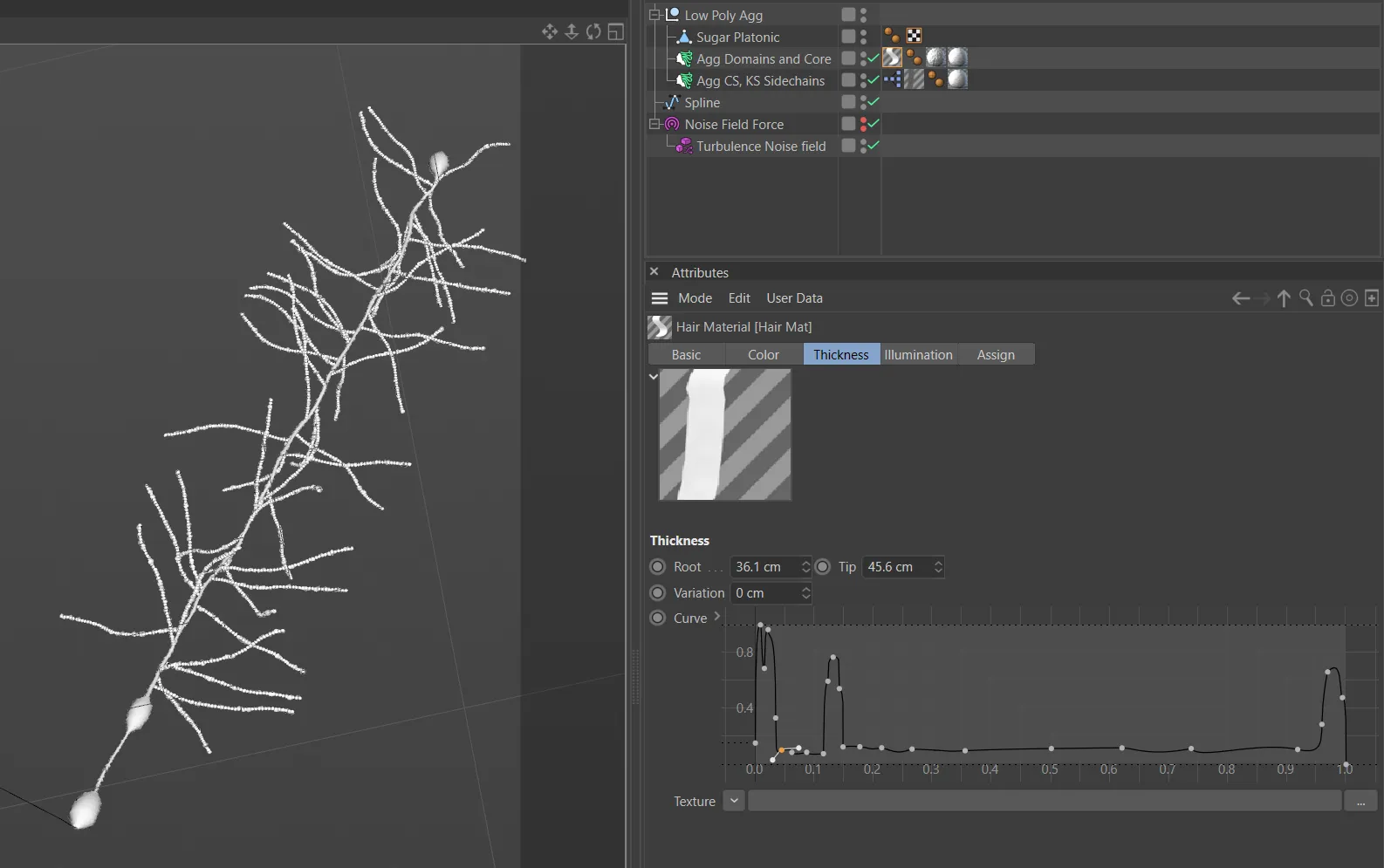
While I first attempted to use Mosplines cloned to point selections on the aggrecan core for the keratin-sulfate and chondroitin-sulfate glycosaminoglycan (GAG) side chains, the whip-like action was just a little too creepy for my taste, and it seemed untamable no matter how much friction was added. After that point, all the GAGs, including the hyaluronan chains were constructed with GAG disaccharide-units. These were point clouds cloned along pinned hair splines. The dynamic animation came from turbulent forces, random sugar spinning, and small random motions of the cloned atoms. That was for the close-ups.
For the background molecules, the long flowing ones, i.e. hyaluronan and aggrecan, I’m also using hair, But only hair. Rather than suffer the tremendous slow down from cloning atoms onto dozens of dynamic point clouds, all of the geometry was created in the hair object, with thickness curves for the profile of the aggrecan globular domains, and noise-driven displacement in the material to mimic thermal motion.
Rigging the hydrolysis of aggrecan
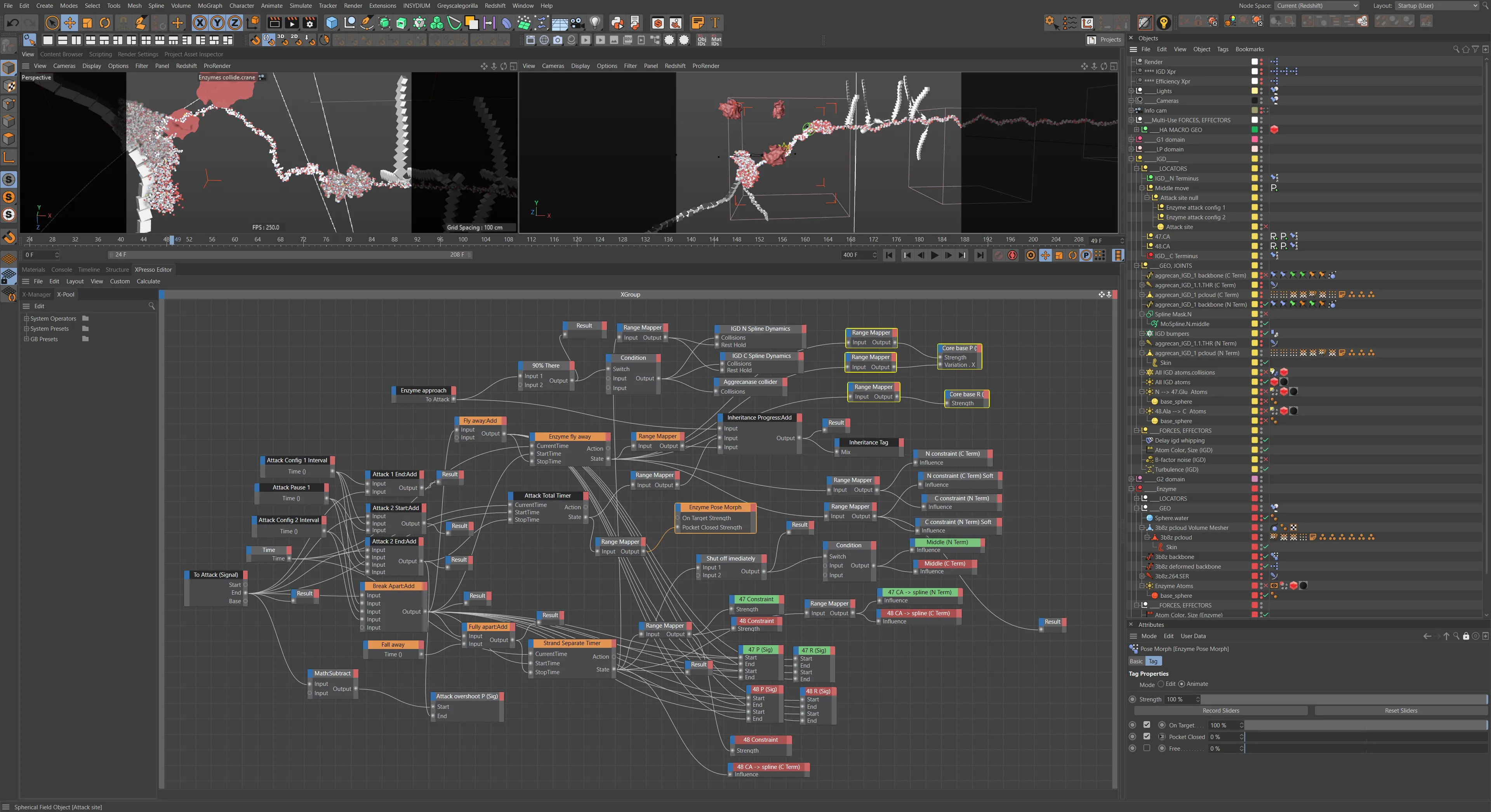
Leaving an uncoiled strand for the IGD made orchestrating the enzyme attack and hydrolysis of aggrecan a little easier. Nearly all of the animation is accomplished through dynamics and pose morphs. These animations are triggered and controlled by procedural timing set up in Xpresso, Cinema 4D’s visual scripting system. The Xpresso nodes controlling the timing and interactions are fairly complex and intertwined.
Enzymes attract / repel to IGD
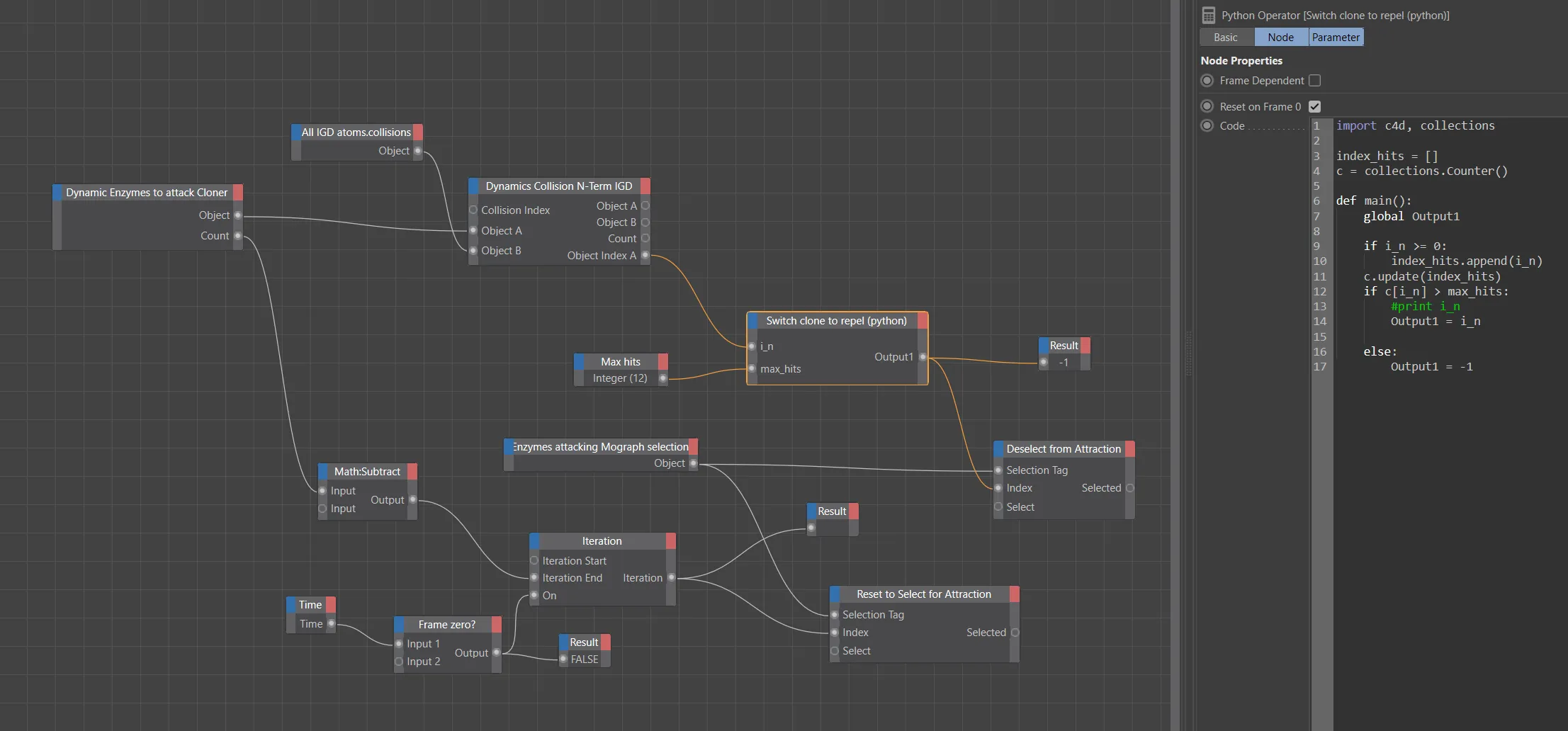
It took a while to choose a noise type for the ‘swarming’ aggrecanase enzymes that would attack the IGD. Because most molecules travel through their environment in a random walk or Brownian motion, each enzyme would bounce back and forth against the IGD several times either before finding the cleavage site or being jostled away. This again is where visual clarity won over accuracy. The noisier attacks were just too jarring for this piece. In the interest of time I allowed the unsuccessful enzymes to collide with twelve atoms on the substrate in the IGD (tallied in a python Xpresso node using the python collections.Counter() module method) before being repelled away.
Hydrolysis orchestration
Here is the main event. Normally aggrecanase, the enzyme we’re showcasing, is synthesized in the chondrocyte and released to assist in the cleavage of aggrecan from the hyaluronan threads. This is so the pericellular matrix can be remodeled as the cartilage shifts around in a growth phase or for other maintenance reasons. But this time, it’s for not so great reasons, for pathological reasons… osteoarthritis. While this aggrecan will be released into the ECM and eventually siphoned away into the synovial fluid, it likely won’t be replaced by newly synthesized aggrecan, which means less osmotic pressure in the ECM, degrading cartilage, and less shock absorption.
As far as enzymes go, this type is a metalloproteinase, in which a Zn(2+)-activated water molecule acts in a nucleophilic attack on the carbonyl group to hydrolyze the peptide bond. This orchestration made significant use of action timers (which indicate state), Signal tags, spline-dynamics, hair colliders, hair constraints, and parent constraints to guide the water molecule and substrate into the active site without intersecting geometry, and then transfer and separate atoms and groups.
Representing the fidgetiness of molecules (B-factor vs NMA coarse grained, ENM, GNM)
These days, the most accurate and computationally feasible way of portraying the movement of atoms within a protein is something like showing the harmonic oscillations of the loops and domains of the protein by doing normal mode analysis (NMA) using an elastic network model (ENM) or Gaussian network model (GNM), which is a faster type of ENM. These models can simulate a few seconds of atomic movements. On top of this, the motion of individual atoms can be simulated and added through computationally intensive molecular dynamics (MD) simulations. However, these all-atom MD simulations are limited to modeling just milliseconds of motion. Combining the two can get you close to the B-factor, or temperature factor, which is the thermal motion measured by the x-ray crystallography. For the next molecular animation I make, using the space-filling, CPK representation style, I think I will plan to incorporate that level of simulation. But for this animation, I suppose you could say I took a shortcut. Instead of elastic springs and dynamic simulations, I remapped the B-factor value for each atom to drive a turbulent noise displacement of each atom’s position. Without the soft clamping on the upper values, the atoms would have appeared to be flying around, unbonded. So the fluctuating torsion angles of each residue and loop are not driving motion here. The residues are however rigged to a joint system at the alpha carbons strung through a spline dynamics tag, and carefully sculpted poses (of the S1’ loop) were chosen for the enzyme’s binding conformation with the ligand from the pdb, adjusting joints to avoid steric hindrance.
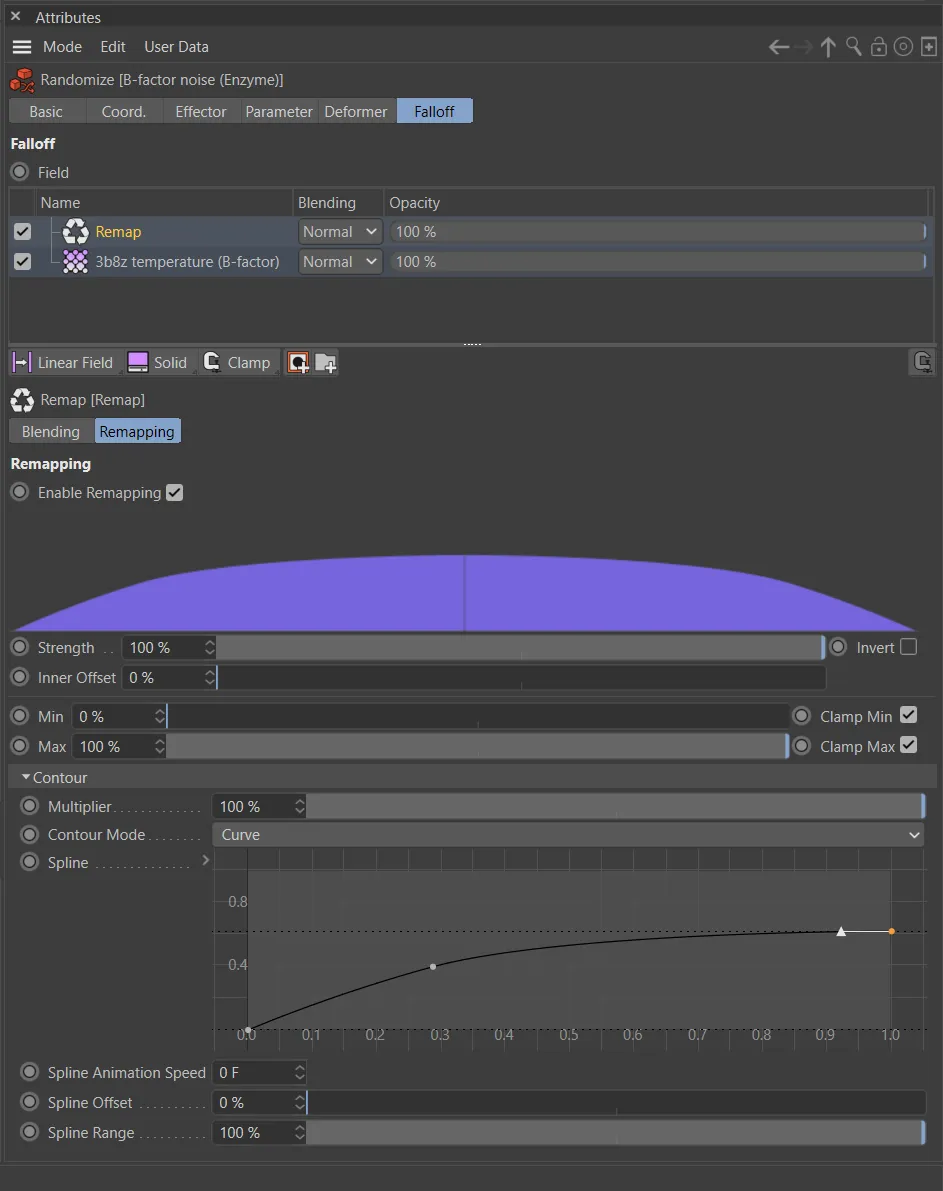
Complicated failure
At first I thought I may as well try to represent the disaccharide units as accurately as possible with a joint-rigged polygonal system with steric constraints, and a series of random, directional, and time offset effectors. The sheer reduction in speed when cloned hundreds or thousands of times was obvious and foreseeable, so I suppose this was really just an exercise in curiosity, before I figured out how to make the simple hyaluronan and chondroitin sulfate disaccharide pdbs and add the b-factor turbulence hack from above.
Collagen VI L-System
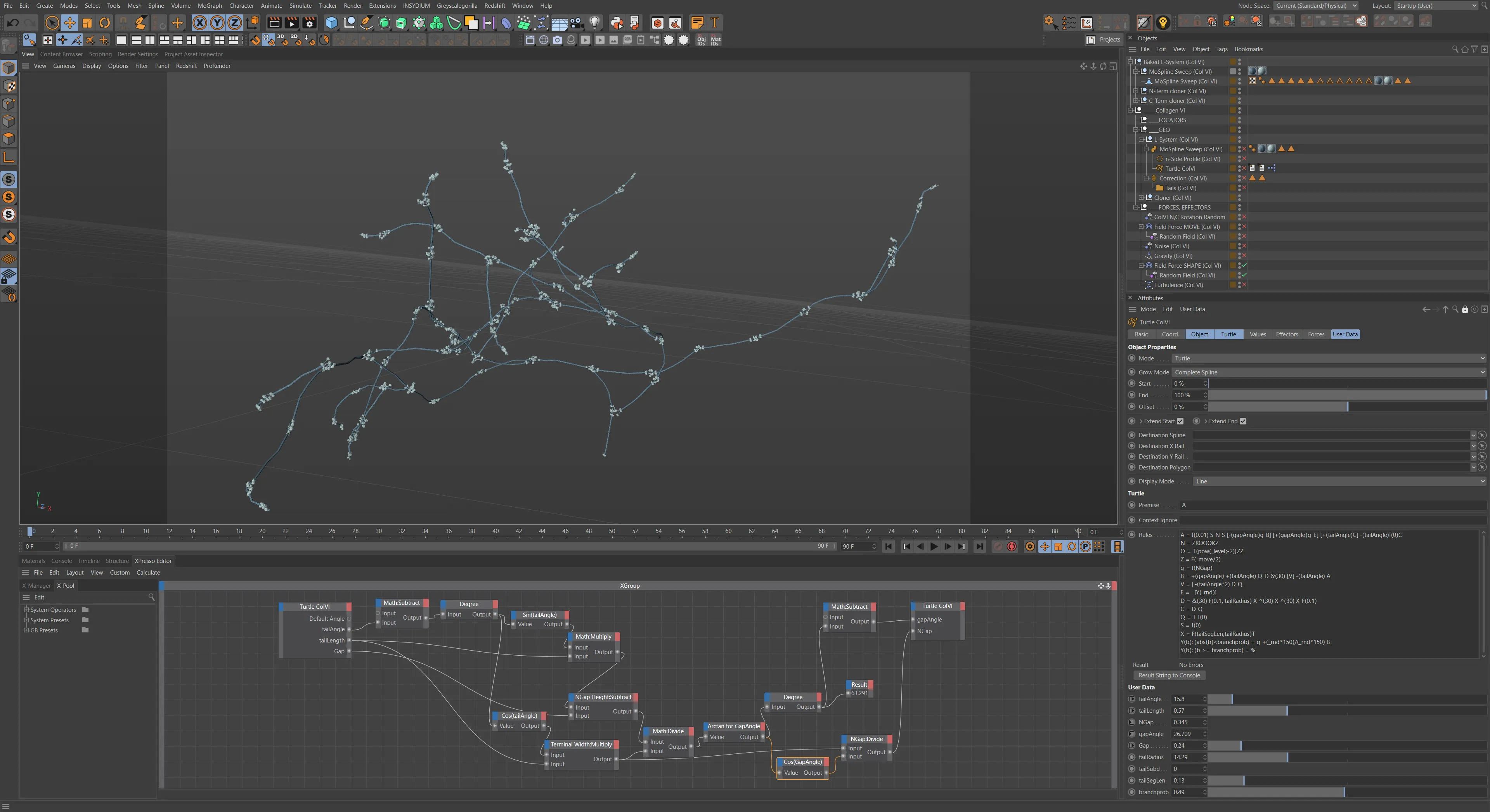
Collagen VI, featured in the pericellular matrix of the chondrocyte, is responsible for connecting and anchoring the rest of the collagen network, the proteoglycans, and the cell. Like all the other types of collagen it consists at base level of a right-handed triple helix of polyproline II helical polypeptides, called α-chains. These join into dimers and then tetramers through non covalent forces. The linking and branching microfibrillar structure of collagen VI seemed like it would be an interesting design target for an L-System. So I did that, and boy was it a nice, complex series of rules with branching probabilities, custom user data, trig functions, and different domains being placed by the c4d cloners at different symbols… except it turns out that type VI collagen… does not branch, which I recently discovered, having done further reading for this project summary. The photos (electron micrographs?) certainly made it look like they did though. Lesson here… well let’s be honest, the col VI was such a background element that crisscrossing single strands would have looked practically the same. And I got pretty good practice at L-Systems too, despite the inaccurate branching assumptions.
Procedural textures for all but macro shots
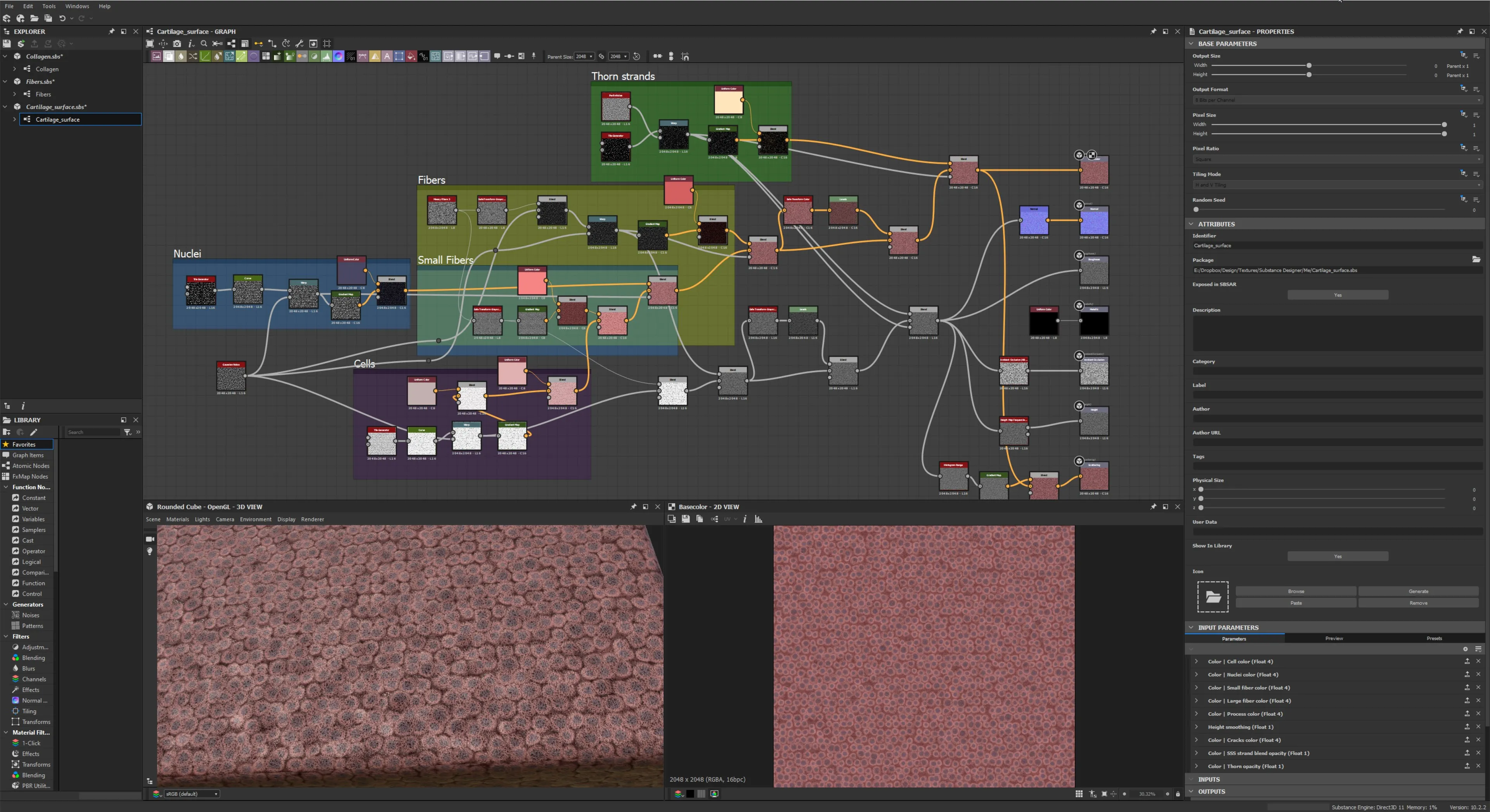
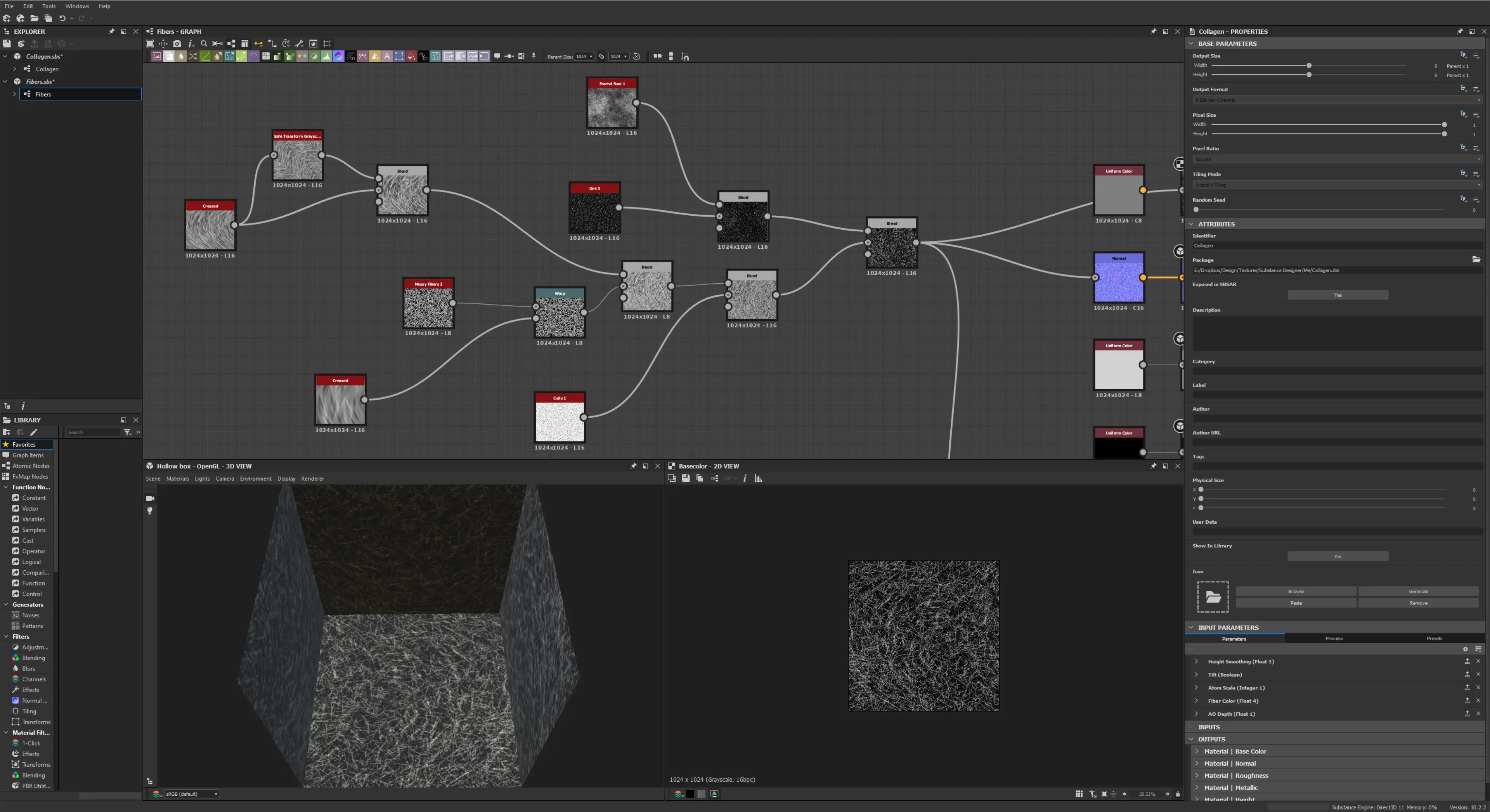
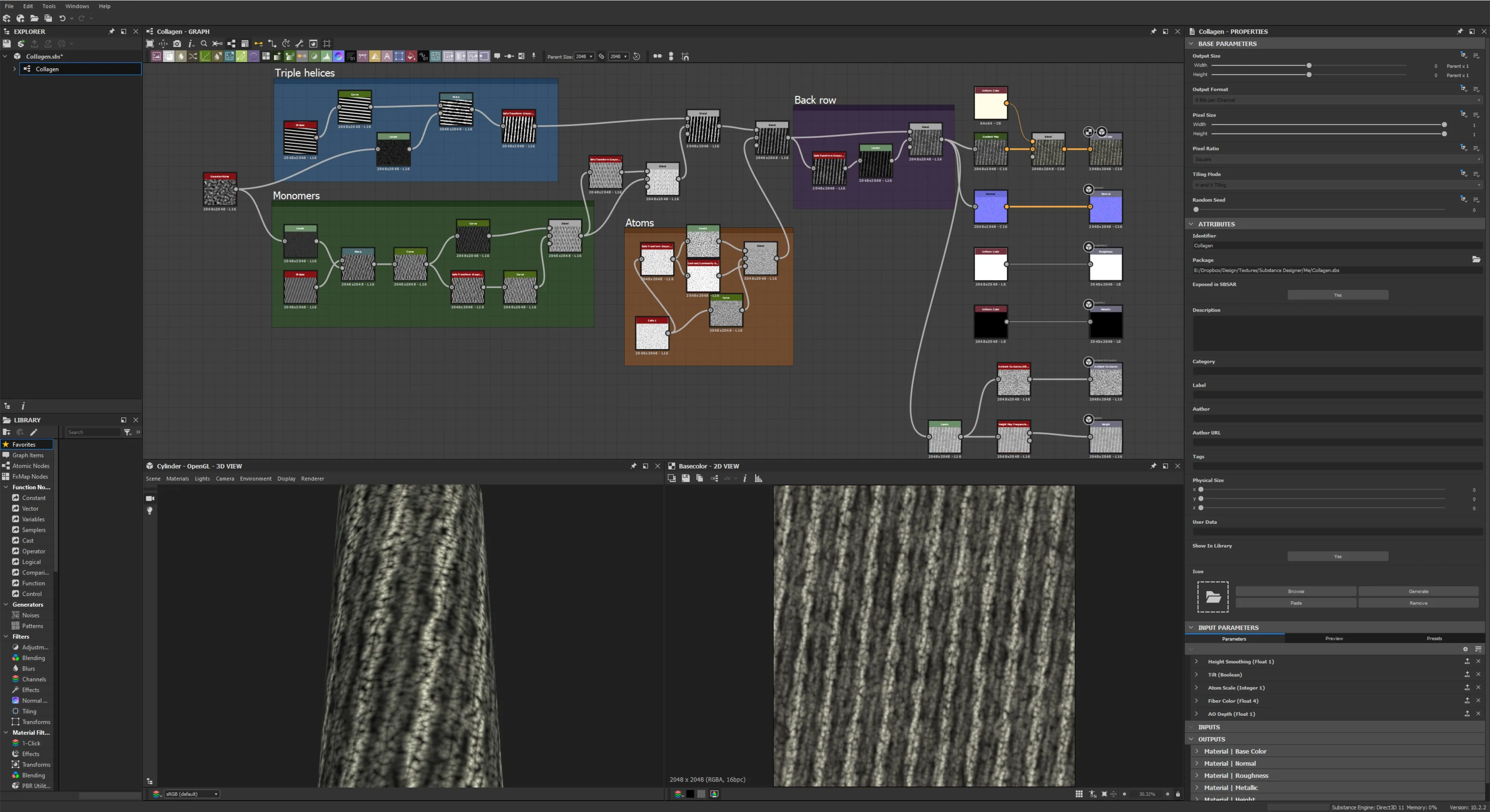
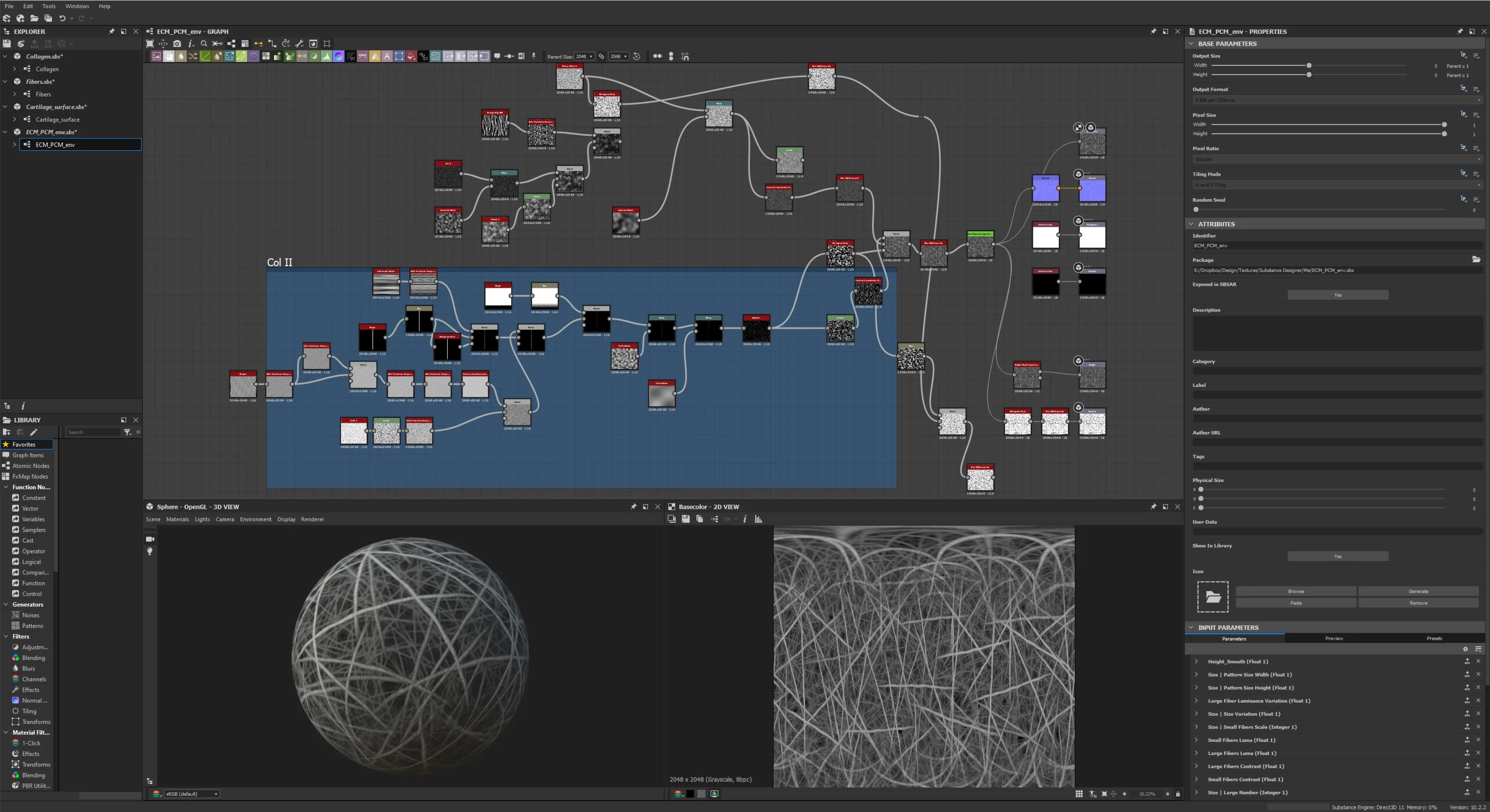
Nearly every bit of surface geometry that isn’t a close-up shot was a candidate for adding major detail through texture in this piece. Whether is animated noise-driven displacement on shaders for the background aggrecan, hyaluronan or enzyme geometry, or using the king of procedural textures: Substance Designer. It’s built for creating complicated, layered shapes within a material shader, which let me recess alternating triple helix collagen fibrils into the fiber bundle, or place a collagenous layer over the superficial zone cells of the articular cartilage, or create entire basement membrane fiber network layers for the chondrocytes. I was even able to recreate a highly displaced background collagen fiber nest for the chondrocyte when the camera entered the pericellular matrix. This saved tons of rendering time that would have been dedicated to sampling the hundreds of textured spline-based (render-time) tube geometry from the previous shot. When textures can replace complex or repetitive geometry, it’s probably worth the time jumping into Substance.
A few takeaways
Above all, new technologies, especially AI technologies accessible through the web make getting complete protein assemblies now possible in more and more cases. Less time will be spent implementing novel techniques in building out geometry thanks to AlphaFold. This means more time can be spent on rigging the molecules, if you plan to show enzymatic reactions and the conformational changes of the enzyme and/or substrate. Automated rigging of molecules using Python scripts just got that much easier with the advent SDK/API aware LLMs like OpenAI chatGPT-4 (although none seem capable of writing a new script on their own without errors yet). While rigging won’t result in the experimental accuracy of a pure simulation, it does result in something that I think looks better, and will after all be art directable (simulations can always be there for reference). And you can of course go overboard with the rigging too. But in most cases, using procedural texturing (with displacement, possibly animated if it’s not that far from camera), the versatile hair object, and sometimes even L-systems, should be the go to method for filling in background elements. That is if project speed and viewport navigation is a priority. And why wouldn’t it be? - unless you are just making a still render rather than an animation.
Please let me know if you’ve noticed any mistakes or oversights. Or for any clarifications: geoff@picodesic.com